Swarms: a thousand agents working as a team
What swarms are, how we built them, how we use them, and where we think they're going
What swarms are, how we built them, how we use them, and where we think they're going
This week we opened swarms to everyone on grep.ai. We've been using them internally for a while, mostly by mentioning one of our agents in Slack and asking it to run one, and it's been a lot of fun watching a single message spin up thousands of agents. This post is the technical side: what swarms are, how we built them, what we use them for so far, and how we think they'll evolve.
AGENT SWARMS ARE HERE *To accelerate your business Today we're launching Agent Swarms @grepdotai to accelerate your business by tackling the backlogs your team can't keep up with. Swarms are teams of agents that work together to automate a task queue in parallel.
What is a swarm?
An LLM call became an LLM with tools, and an LLM with tools in a loop became an agent. Skills, MCPs and sandboxes made the loop a lot better, but it's still one loop: an input goes in, the agent works until it reaches the objective, and an answer comes out. A swarm is the next step. You give a group of agents one objective, and they work on it together until they get there.
Static version
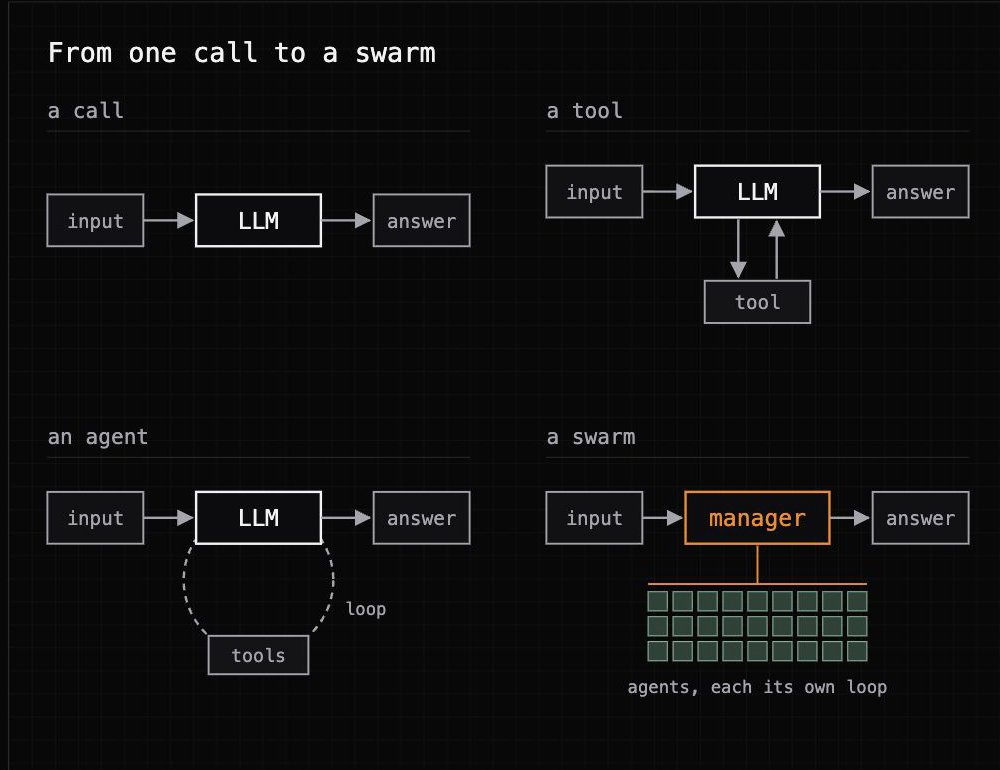
When we defined swarms, we were very opinionated. A swarm can be a batch, one agent per row of a list, and sometimes that's all the job needs. But it isn't just a batch. When agents work together toward an objective you usually need more than one operation over a list. You need stages, where one builds the list, the next researches every company on it, and another writes it all up. You need a workforce of agents with different expertise, each with its own skills and tools. And over all of it you need a coordination layer, a manager agent on a frontier model that owns the objective from start to finish.
Static version
And the agents can't run blind. A swarm is expensive, thousands of agents each burning compute, so it has to correct itself while it runs. When an agent gets stuck, or finds a shortcut, or learns something its neighbor needs, that has to reach the right place while the swarm is still running, not in a post-mortem. That coordination is what makes a swarm sturdier than a static workflow that runs the same steps no matter what it finds.
1. The manager runs the swarm
Stages
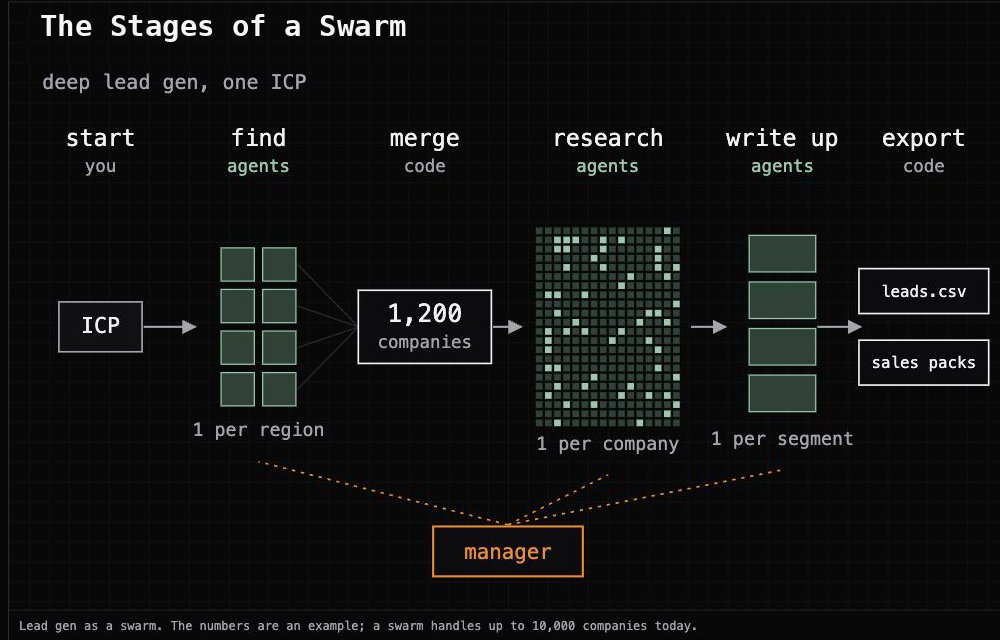
A swarm runs in stages. The easiest way to see them is the lead-gen swarm we run on ourselves, which works like a spreadsheet that fills itself in.
The first stage finds the companies. We hand it our ideal customer profile and it comes back with a list, one company per row. When we want a longer list than one search can produce, we split the search up, one agent per region, and the swarm merges the lists and drops the duplicates.
Then every company on the list gets its own agent. A thousand rows means a thousand agents researching at the same time, each filling in the same columns for its company: what they sell, who they're hiring, what their leadership has been saying. An agent can only fill in its own columns, so a thousand of them can't mix up which company is which.
The last stage is one agent that reads everything the others found and writes it up, as a report per segment and a sales pack per company. Merging the tables and exporting the spreadsheet is plain code, so it costs nothing and can't make anything up.
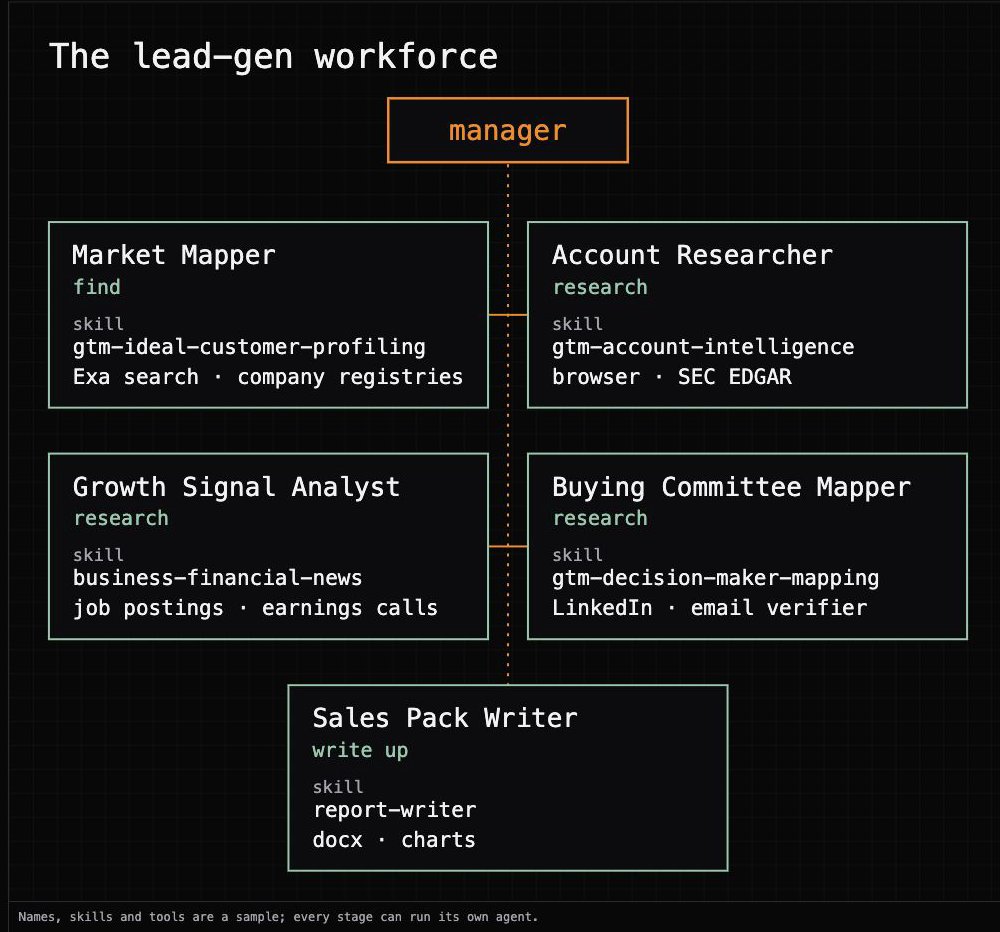
Each stage has its own specialist. In this swarm the research step is really three agents, one for the company, one for growth signals and one for the people to talk to, so five agents work under the manager:
Static version
Not every step needs a full agent, either. An agent can learn the job on the first handful of companies and write it down as a workflow, and the rest of the list runs the workflow instead, up to 90% cheaper per company. The tricky ones still go to a full agent. When you're running thousands of them, that's the difference between a swarm worth running and one that isn't. We wrote about how an agent learns a job and turns it into a workflow here.
An agent that ticks
A swarm can run for hours, and keeping a frontier model awake that whole time just to watch it would be a waste. So the manager is an async agent that ticks, a pattern that's becoming common in coding harnesses. It wakes up, reads the state of the swarm, moves things along, and goes back to sleep, over and over until the swarm is done.
Static version
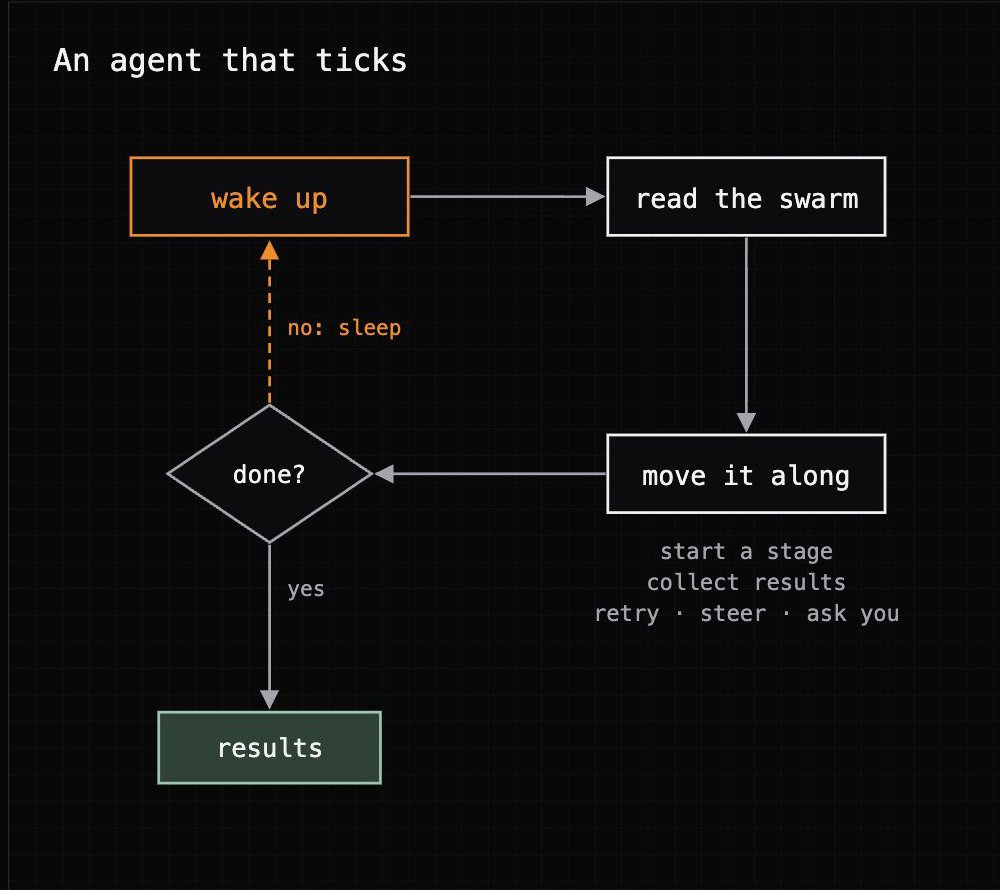
The split is what makes it cheap. Everything mechanical runs in code on every tick: start a stage when its inputs exist, collect the results when its agents finish, run the joins and exports. The model only wakes up for judgment calls, like what to do about forty companies that came back empty, or whether a plan that can't hit its target needs a question for you. So the frontier model spends its tokens on decisions, and the budget cap stays in code, where the model can't argue with it.
The bridge to "you"
The manager is also the only one in the swarm who talks to you. Before launch it asks the planning questions, like what counts as a match and how many you want. While the swarm runs, it brings you the questions it can't answer by itself. When it's done, or when it needs you, it says so in the chat you launched it from.
And "you" is usually an agent. Swarms are the first feature we built end to end for an agent to use before a person. You can launch one from the brain chat at grep.ai, but the main door is the Grep MCP, and most of the swarms we run start from Claude Code, Codex, or a Slack mention.
That works because MCP now has the pieces agents need to hand long jobs to each other. A swarm is an MCP Task: your agent starts it, gets a task id back, checks progress whenever it wants, and gets the deliverables as the result. It doesn't have to sit there polling, either. With MCP Events it subscribes to the swarm and gets a signed callback when the swarm finishes, needs attention or gets cancelled, so it can go do something else and come back when there's news. And in clients that render MCP Apps, the swarm's live grid shows up right in the chat.
So you can launch the same swarm from Claude, from ChatGPT, or from whatever personal agent you use, and that agent can run it for you end to end. The whole surface is seven calls:
2. How the agents talk
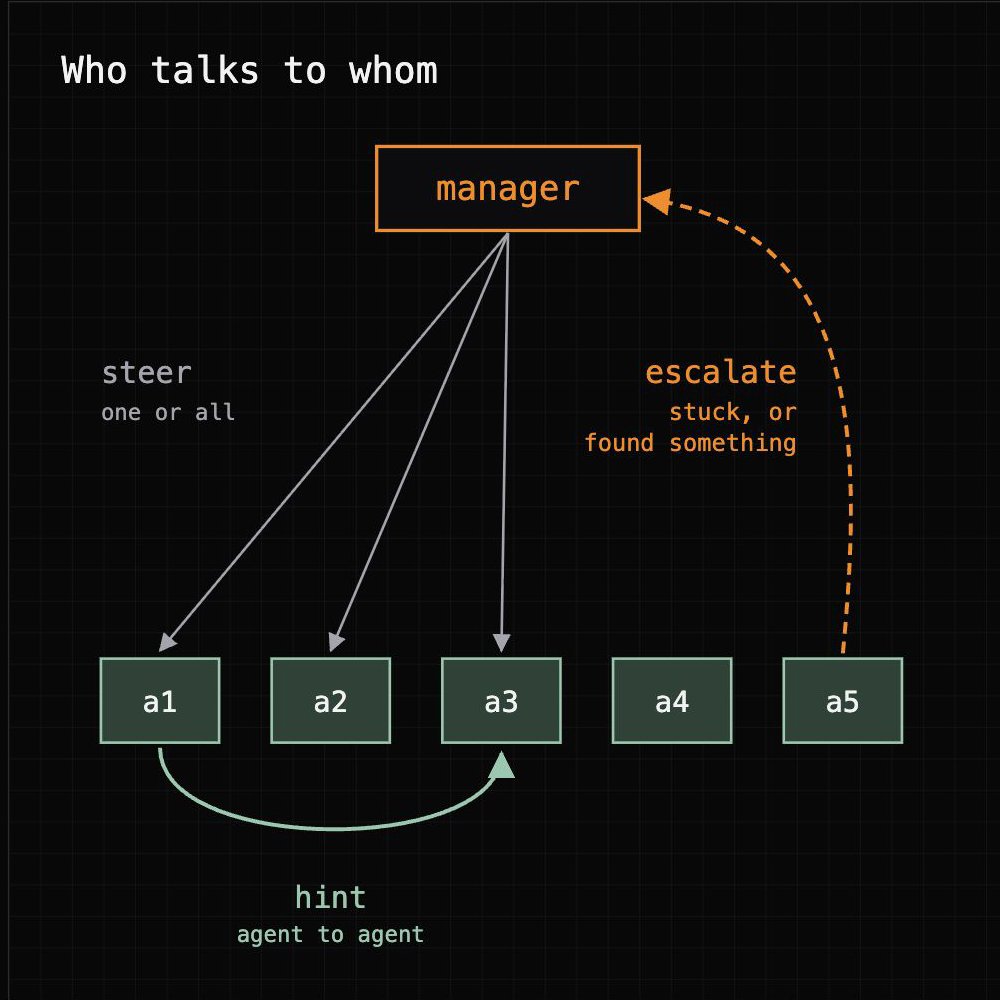
Messages in a swarm go three ways. The manager talks to one agent or to every agent in a stage: "Use the state registry's bulk search, it has the officer list. Stop searching the web for it." That's steering, and one sentence like that saves a thousand agents the same detour.
Agents talk to each other. An agent that finds a parent company's filing listing its subsidiaries can tell the whole stage, and any agent working on one of those subsidiaries skips the search.
And agents talk to the manager. An agent escalates when it's stuck, when it needs a decision, or when it found something everyone else should know. The manager can answer it, pass it on to the whole stage, or bring it to you.
Static version
Inboxes
Under the hood, the messaging mechanism is fairly simple. Every agent in a swarm has an inbox. A message from the manager, or from another agent when it's allowed to talk to it, gets pushed straight into the agent's active transcript, so it reads it on its next turn without stopping what it's doing. The manager has an inbox too. Agents push to it, and it reads everything that came in on its next tick.
Message from the manager: The state registry's bulk search returns the officer list on its second page. Go straight there. Message from agent m-203 to every agent of this stage: Northwind Holdings' 2024 annual filing lists its subsidiaries. If your company is one of them, the filing is in my sources. Message from agent m-117 (Northwind Freight): That's mine, thanks. Can you send the filing's page with the officer list?
3. How we use swarms
When agents showed up, we made sense of them with a human analog. An agent does a job the way a person would. It reasons, explores options, looks at the evidence, and tries again until it's finished. That's how most knowledge work gets done.
I'd argue swarms don't have a human analog. People do coordinate at huge scale: a stadium sings the same chorus, a country votes in one day. But each person does one simple thing, and nobody needs what the person next to them found. What we've never been able to do is put ten thousand skilled people on one piece of knowledge work, have them share what they learn as they go, and get the result back the same day. With a swarm you can get thousands of agents, hundreds of thousands, potentially millions, with frontier intelligence and the tools, browsers and data they need, and you start them with a message.
The closest thing we have is a BPO, a temporary workforce, usually somewhere cheaper, hired to do the tedious work. Even a BPO needs two to four months before a new team runs steady. First you hire, then you transfer the knowledge and train, and then you wait out the ramp until the work is any good.
100,000 businesses
Take a bank with 100,000 business customers. A lot of them were onboarded years ago and nobody has looked at them since. Is the company still active? Does it have a website? Does it still sell what it said it sold when it opened the account? Checking that means looking at its administrative records, calling customer service, pulling the credit registries. Call it 30 minutes per company for a light check, far less than a full KYC review.
Thirty minutes times 100,000 is 50,000 hours, which is 25 years of one analyst's working life. Hire 100 people and each one has about three months of work, after the two to four months it takes to stand them up. Call it six months and a team you have to pay the whole time. The bank does that math and makes the rational call. It skips the check and keeps the risk. That's an assumed risk, one you carry because measuring it costs more than it's worth.
Static version
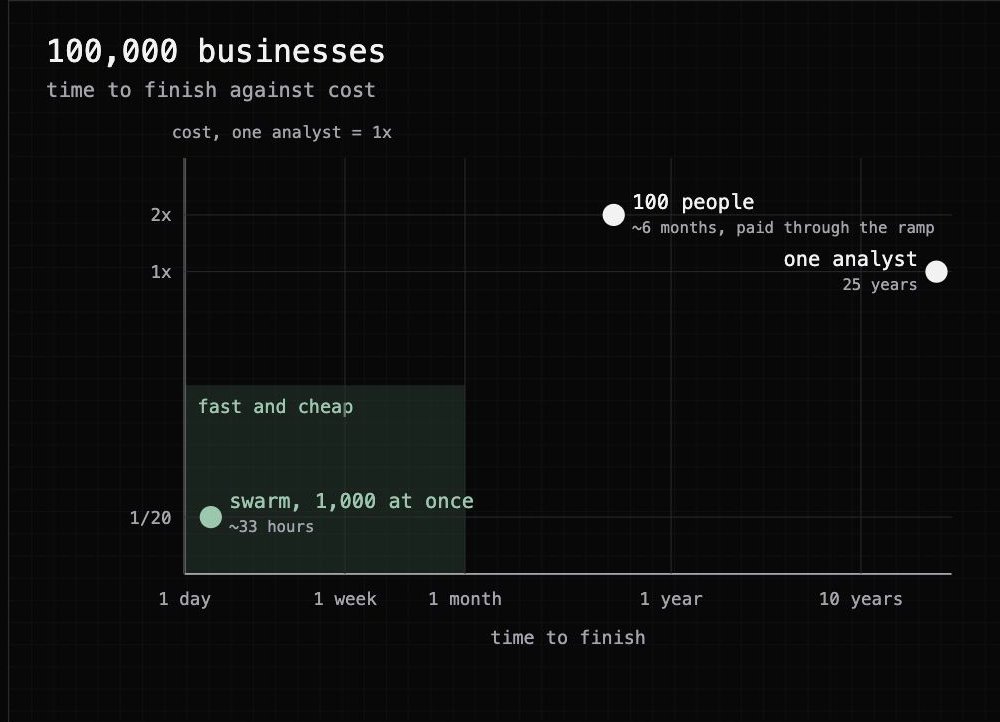
A swarm changes the math. The check is written once and run across the whole portfolio, one agent per company, and a last agent reads the results and proposes what to do about each customer. One swarm handles up to 10,000 companies today, so 100,000 businesses is ten swarms, and an agent can launch all ten. In our own GTM swarms a deep-research agent takes about twenty minutes per company. With 1,000 running at once, 100,000 companies takes about 33 hours. Each check costs about a twentieth of the analyst's half hour, before any of it runs as a learned workflow. At that point the bank doesn't have to assume the risk anymore. It can measure it and do something about it.
Accelerating both sides of growth
That's the compliance side, the backlog you could never get through. The other side is growth, when you aren't finding customers fast enough, and we use swarms there too, for deep lead gen. It's the swarm in the diagram up top. We start with an ICP and discovery finds hundreds or thousands of companies that fit it. Then one agent per company looks for signs of a growth bottleneck. Are they hiring a lot of operations people? What has their leadership said about the problems they're fighting, on earnings calls, in interviews, on LinkedIn? Anything that tells us how to approach that company and how agents could help it grow.
A last agent turns all of it into a package per company or per segment, so our team walks into each conversation already knowing what that company is up against. Traditional enrichment can't give you this, because every row is a small piece of deep research.
Where swarms go from here
Some of what's next is already clear to us. Agents will share more of what they learn while they work, so the thousandth agent in a stage starts smarter than the first. More stages will run as learned workflows, and swarms will run on a loop, rechecking a whole portfolio every month instead of once.
But I don't think we've seen the best uses yet. Take a modern GPU back to the people who built the first computers. They'd use it to do the math they were already doing, only faster. Nobody in that room would have come up with video games, or with training a large language model. We think we're that early with swarms. The uses in this post are the obvious ones, the ones that look like work we already know how to do, and the ones that matter most probably haven't been thought of yet.
Try it
Swarms are early, and they're open to everyone on grep.ai. Point one at something you've been putting off because it was too big. Then tell us what you'd use swarms for, and what we should make better.
PS: We also had a bit of fun with this launch. See our ad below.
∗THE SWARMS ARE COMING∗