Control plane
Run different harnesses through one API. See the work, step in when needed, and keep control of your agents, revisions, and spend.
API referenceOne way to manage every harness.
Define instructions, tools, and execution settings once. Your application uses the same agent and run resources across Pi, Claude Code, Codex, and OpenCode.
- Keep changes traceable.Edits create revisions. Each run records which version it used.
- Update without changing active work.New runs use the new revision; existing runs keep theirs.
- Choose your interface.Manage the same resources from the console, API, or MCP.
New instructions reach new runs.
Work in progress keeps its revision.
Create, run, and inspect an agentTypeScript example · resource model · revision handling
With a server and model key configured, this example creates a Pi agent and starts a capped run. Use a new agent ID on the first call; later requests can reuse it. The timeline returns one page, not necessarily the completed result.
// Node.js with the server's printed /v2 URL and API key.
const base = process.env.AGENTRUN_BASE_URL!.replace(/\/$/, '');
const token = process.env.AGENTRUN_API_KEY!;

// A local helper using native fetch, not an AgentRun SDK.
async function request(path: string, body?: unknown) {
  const response = await fetch(base + path, {
    method: body === undefined ? 'GET' : 'POST',
    headers: {
      Authorization: `Bearer ${token}`,
      'Content-Type': 'application/json',
    },
    body: body === undefined ? undefined : JSON.stringify(body),
  });
  if (!response.ok) throw new Error(await response.text());
  return response.json();
}

await request('/agents', {
  definition: {
    id: 'triage', name: 'Issue triage', harness: 'pi',
    instructions: 'Triage the supplied issue. Ask for missing context.',
    tools: ['ask_person'], max_cost_usd: 2, cap_mode: 'strict',
  },
});

const { run_id } = await request('/agents/triage/runs', {
  input: { content: 'Checkout fails on Safari. What should we investigate?' },
  max_cost_usd: 1,
});
console.log(await request(`/runs/${run_id}/timeline?wait_ms=5000`));
console.log(await request(`/runs/${run_id}`));Continue polling with the returned next_after cursor as after until final, or use server-sent events. For definition edits, send the current home_etag as If-Match to detect concurrent changes. Check /v2/capabilities for the harnesses available on your server.
| Resource | What you can inspect |
|---|---|
| Agent | Its identity, current definition, granted tools, and run history. |
| Definition revision | Instructions, skills, harness, execution settings, and parent revision. |
| Run | Pinned revision, status, pending input, result, error, and estimated cost. |
| Turns, events, and files | Conversation and tool activity in the timeline; files in the run workspace. |
See the work. Step in when it matters.
Follow a run’s conversation, tool calls, files, and result. When an agent needs context, answer in the same run and let it continue.
- Find the runs that need you.Filter work by agent and state, then inspect its timeline.
- Stay in the conversation.Provide missing input, steer a run, or stop its current turn.
- Keep the evidence.Review the revision, tool activity, outputs, and cost together.
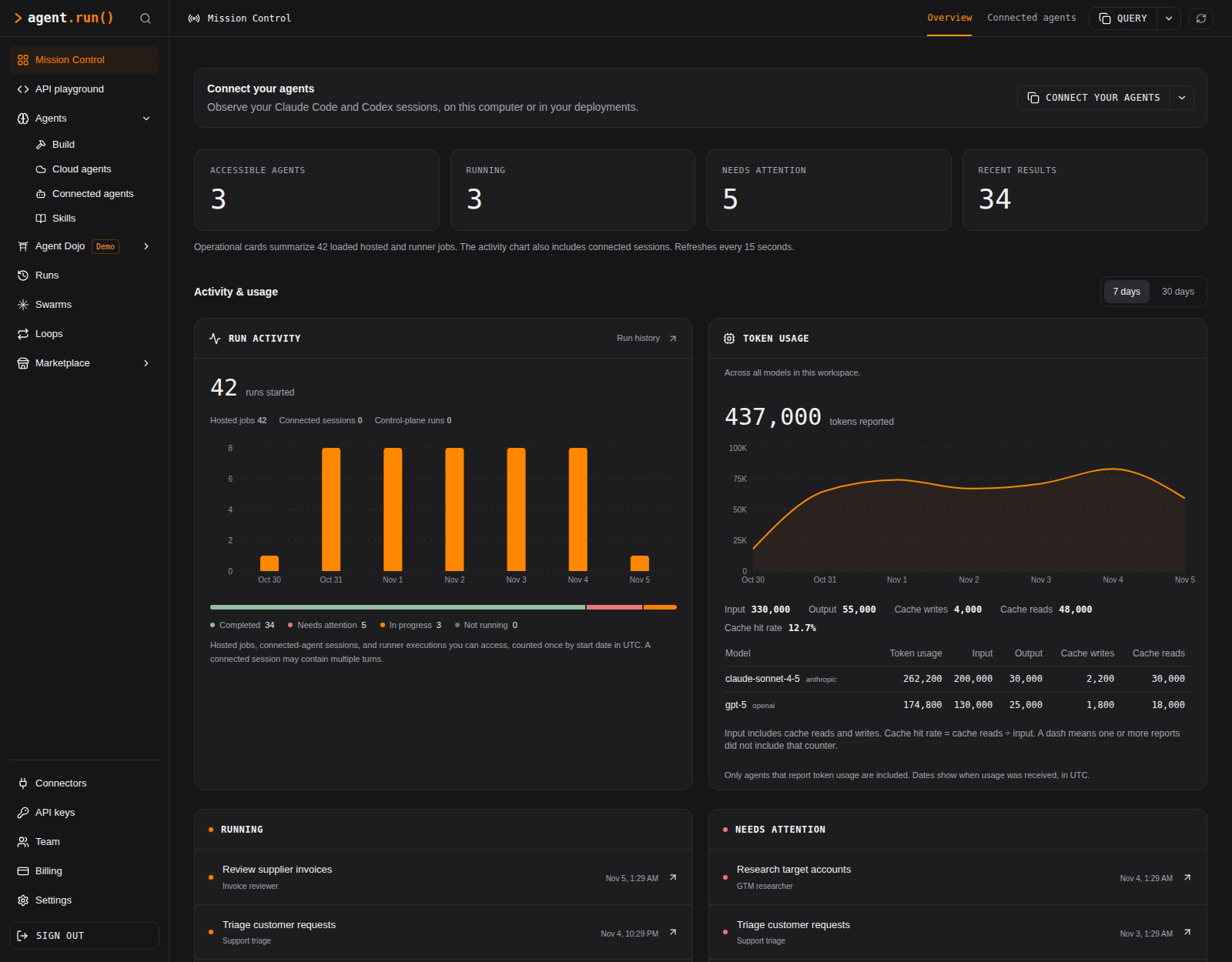 Explore the console view
Run controls and stored stateMessage, stop, cancel, and pause · self-hosted storage
| Control | Behavior |
|---|---|
| Message | For agentic runs: steer the agent, answer its question, or send a follow-up after a stop or completion. |
| Stop | End the current agentic turn. The run becomes input_required and can continue with a follow-up. |
| Cancel | End the run as cancelled. It cannot be continued; start a new run instead. |
| Pause / resume | Workflow runs only: let in-flight work finish, then hold new steps until resumed. The pause survives a server restart. |
The self-hosted server includes the console. Persist its data directory and retain the sealing key across deployments. That directory holds definitions, revisions, run databases, logs, workspaces, and agent learning files.
Run lifecycle and recovery Storage layout Deploy the server and consoleStart work automatically. Keep spend under control.
Trigger agents from your application, a schedule, or a signed webhook. Give each run a budget and handle requests for more through the same API.
- Connect work to events.Use schedules and signed webhooks to start the right agent.
- Set a cap for each run.Keep a definition default or supply a limit for a specific job.
- Resume with a decision.If a run needs more budget, inspect the request and raise its cap.
Schedules, webhooks, and spend capsTrigger configuration · signing · budget waiting states
Before scheduling unattended triage, grant the example agent a tool that can retrieve issues and configure its access. Its initial ask_person tool can request context, but cannot fetch issues itself.
Send this configuration to POST /v2/triggers to run at 1:30 a.m. Los Angeles time. Every triggered run needs a cap, supplied by the trigger or definition. A schedule skips a firing while its previous run is active or waiting for input.
{
  "name": "nightly triage",
  "source": {
    "kind": "schedule",
    "cron": "30 1 * * *",
    "timezone": "America/Los_Angeles"
  },
  "target": {
    "kind": "start_run",
    "agent_id": "triage",
    "input": { "content": "Triage last night's issues." },
    "max_cost_usd": 2
  }
}For incoming events, use { "kind": "webhook" } as the source. Configure AGENTRUN_SEAL_KEY, save the returned signing secret, and sign deliveries to /v2/hooks/{trigger_id}. Outbound webhooks notify your application when runs need input or end.
Set max_cost_usd on the definition for a default; a run can override it. The example uses cap_mode: "strict", reserving input at its worst-case price. Default expected mode accounts for likely cache hits and can exceed the cap on a cache miss.